
ip 13 pro max bao nhiêu inch – Kích thước màn hình và thông số chi tiết
ip 13 pro max bao nhiêu inch – Kích thước màn hình và thông số chi tiết
Nội dung bài viết
1. Kích thước màn hình ip 13 pro max bao nhiêu inch?
2. Thông số

ip 13 pro max bao nhiêu inch – Kích thước màn hình và thông số chi tiết
Nội dung bài viết
1. Kích thước màn hình ip 13 pro max bao nhiêu inch?
2. Thông số

iPhone 15 Pro Max The Gioi Di Dong – The appeal and top-tier class today
Table of contents
iPhone 15 Pro Max The Gioi Di Dong – The appeal and top-tier class today
Count

iPhone 12 Pro Max Battery: Peak Performance and Battery Life
Table of Contents
Review of iPhone 12 Pro Max Battery
Actual Usage Duration
Battery Technical Specifications
Compare iPhone 12 Pro M

Aimlock Free Fire Max: Optimize the Gaming Experience
Table of Contents
Concept of Aimlock Free Fire Max
Outstanding Features of Aimlock
Aimlock Free F Statistics Board
Guide to checking max 3d pro lottery tickets accurately and quickly
Main content
How to check max 3d pro lottery tickets
The concept of checking lottery tickets
Guide to using lottery checking software
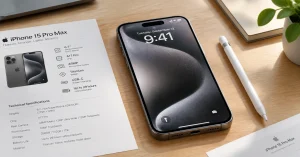
iPhone 15 Pro Max specs – The pinnacle of technology and design
Table of contents
iPhone 15 Pro Max technical specifications
Compare the price of iPhone 15 Pro Max and other versions
This is the News Center for people who want to see the latest news really fast. Featured news, platform updates, new user offers, support sections, and key items to follow are all neatly arranged in one flow. Open it and you’ll understand right away, and browsing on mobile is very light too!

Featured Update: An open bulletin board for new users, prioritizing public content, platform information, and items related to the +889K promotion. One look and you’ll know what to read first.
The update rhythm prioritizes official news, clear category labels, and a very concise detailed reading path. No need to search for long.
Read Details
Each card has a label, posting time, and a view details button. Scan quickly and find the item you need to see.
View UpdatesThe news section is organized by topic so readers can quickly grasp important changes, especially items related to promotions and support.
See MoreThe commercial content area is kept compact, easy to follow, and does not clutter the page.
Read DetailsUpdates for new users are separated for easier quick searching.
Read DetailsAnyone who likes to keep up with the latest rhythm only needs to open this section.
Read DetailsSupport links and frequently asked questions are placed close together for convenient use.
Read DetailsRead a few lines quickly and you will know which part just changed.
Read DetailsThe design prioritizes one-handed use on mobile phones.
Read DetailsReaders can easily see standout benefits, exclusive gifts, and priority flows.
Read DetailsThe display direction focuses on the local experience, compact and clear.
Read DetailsThe short-news format helps you scan very quickly without missing the main points.
Read DetailsChoose the right group and you will get to the content you need right away.
Read DetailsCard frames and color labels help you identify news very quickly.
Read DetailsJust open one page and you can follow multiple news items at once.
Read DetailsPromotions +889K, new user news, VIP 7-level updates, and notes about local payments are the most opened groups right now. Each item has a short reading rhythm, suited for quick viewing.
We prioritize official news, platform content, and updates useful for new readers. What needs to be known first, we put up first!
| Related Topics | Quick Read Points | Links |
|---|---|---|
| Registration Offers | Best if you want to see the latest promotions and gifts. | View News |
| VIP 7 Levels | Content group focused on member benefits and exclusive gifts. | View News |
| Local Payment | Suggested reading for those interested in deposit and withdrawal experiences based on local habits. | View News |
Each bulletin is prioritized from public sources and information displayed on the platform. We keep the writing concise and clear, without overemphasizing details that have not been confirmed.
The news frame is refreshed throughout the day. When there is a new announcement, featured cards and related sections are placed first so readers can catch up very quickly.
Max88 is presented as a structured news system, emphasizing security, stable operation, and a friendly reading flow. The VIP area, exclusive gifts, and local payment are all clearly stated in an easy-to-understand way.
Users can view the 7-level VIP milestones, prioritize reading gift information, and follow payment updates without going through many pages.
Promotion +889K is placed in a separate area so you can understand it at a glance. This is where commercial content is gathered in a neat, bright, easy-to-scan style: registration promotions, new-user offers, VIP information, and highlights related to the bonus fund. No need to read long to get the main point.
This page prioritizes continuous updates throughout the day, especially featured items and public information.
You can go to labels like Latest News, Updates, Promotions, or Support to quickly filter content.
Yes. The news cards are designed for very light mobile browsing, with images and text arranged vertically for easy reading.
We prioritize public data and official content displayed on the platform before posting it to the news section.
Please open the News section regularly or tap View Latest News to go to the most recent update flow.
Yes. The news section has a dedicated area for 7-level VIP, promotion +889K, and related gift updates.
You can go to the FAQ section or switch to the Contact page to see the necessary information.
Open News, view the featured section, then choose the exact category you need. Very fast, very neat!